
 Products
 Orders
 Registration
 Support


Your most reliable travel companion isn't a map or a guidebook — it's a handful of apps on your phone. This is especially true in Korea, where everything from public transit to restaurant reservations, taxis, and food delivery can be handled with a single app. From January to July this year, Korea welcomed about 10.559 million foreign visitors, up 15.9% year over year, and app services for international travelers have been improving just as fast. Here's a detailed look at 6 essential travel apps for Korea, including exactly how to use each one. Download them before you arrive, and your trip will go that much more smoothly.
Blog
Recommended eSIM
6 Must-Have Apps for Traveling in Korea: A Complete Guide for International Visitors
Updated: September 17, 2026
A traveler checking a travel app on their smartphone

6 Must-Have Apps for Traveling in Korea: A Complete Guide for International Visitors
PICK 1
Naver Map: Directions, Ordering, and Reservations All in One
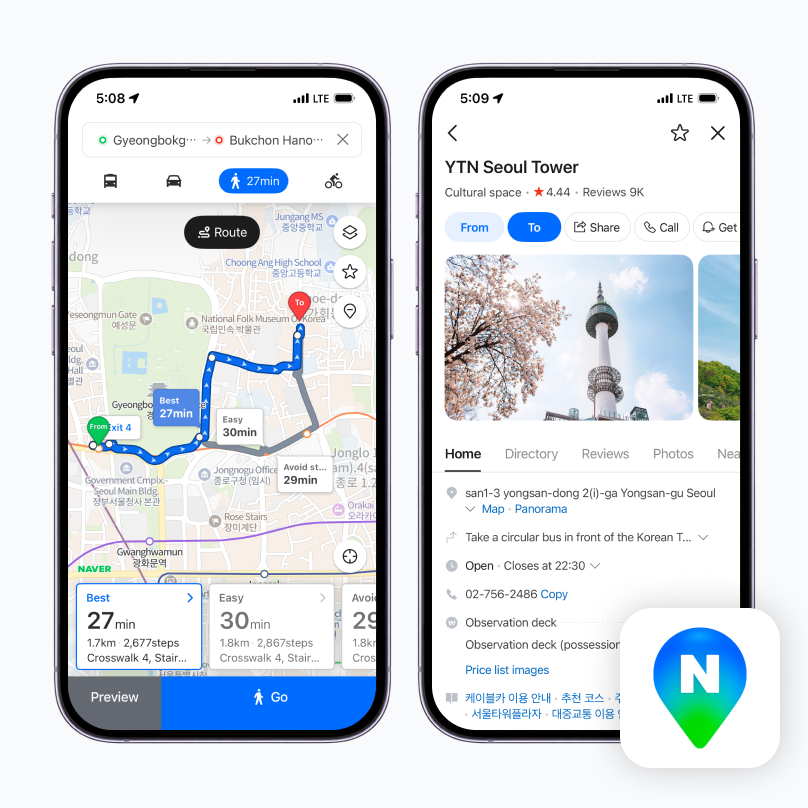
Some of Google Maps' features (like driving directions) are limited in Korea, so locally, Naver Map is essentially the standard. It's the only map app that supports four languages — Korean, English, Chinese, and Japanese. You can check real-time public transit arrival times, subway route maps, boarding and alighting guidance, and alternative transportation options all on one screen, and read place reviews in multiple languages as text, photos, or video.
Using it is simple. After downloading the app, choose English, Chinese, or Japanese in the language settings, then search for your destination — public transit and walking routes will show up together. Check reviews and business hours before you head out to avoid a wasted trip.
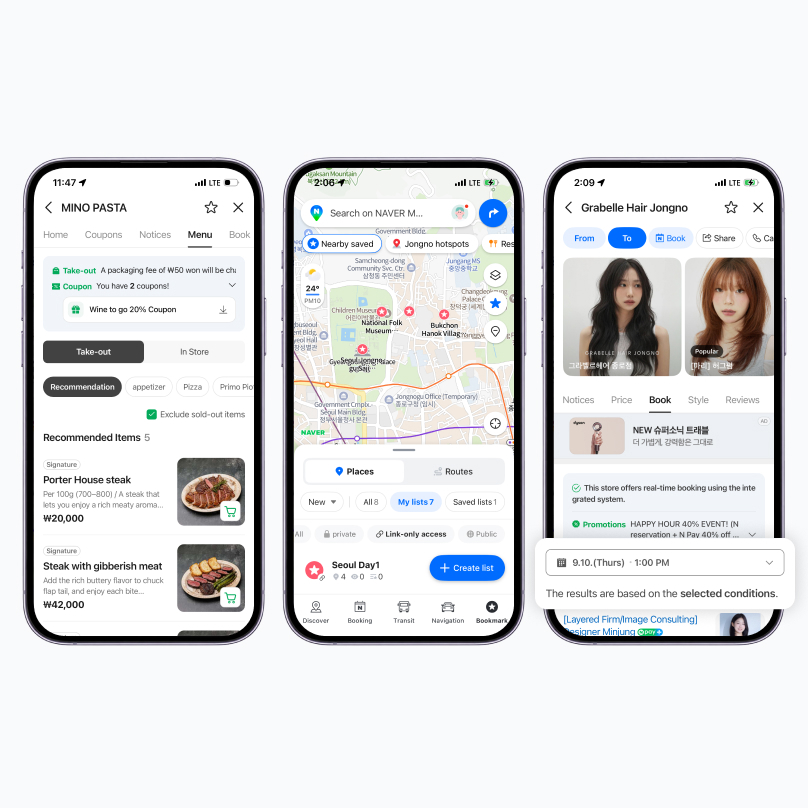
Recommended Features
✅ Bookmark
- Add places you like to a list so you don't have to search for them again every time. Tap the save (bookmark) icon on a place you've searched for to add it to a list, then pull it up anytime from your favorites.
✅ Naver Order
- At stores that support Naver Order, you can place your order ahead of time before you arrive (for takeout). Even when dining in, you can scan the QR code at your table to order through the app.
✅ Naver Reservation:
- At stores that support Naver Reservation, you can book directly through the Naver Map app. Beyond restaurants, you can also book experiences, salons, clinics, and more through Naver Reservation.
PICK 2
Papago: Translate Images and
Conversations Instantly
Conversations Instantly
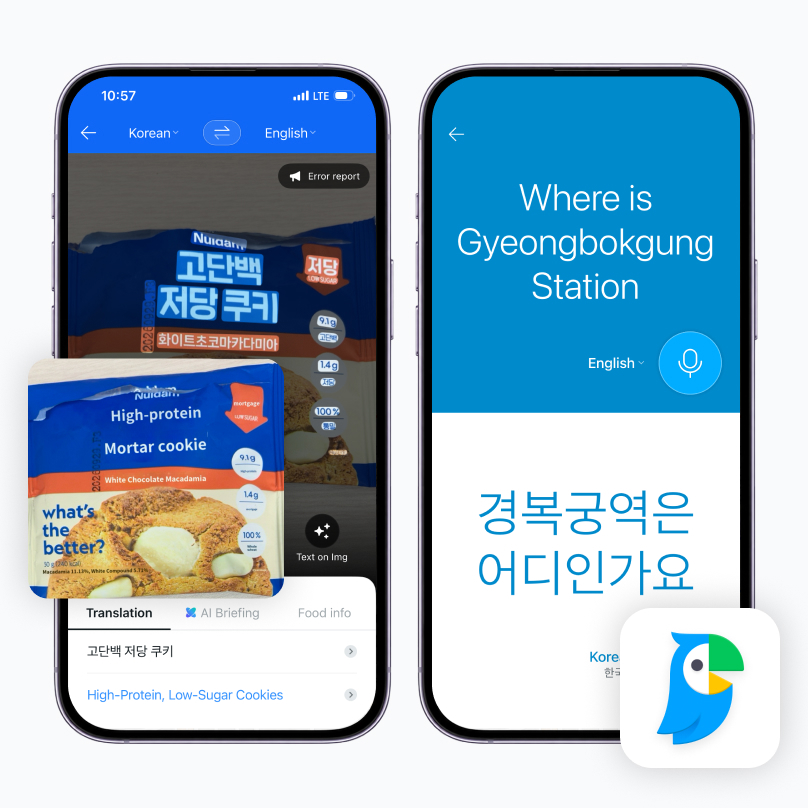
Most of us have had a moment of confusion in front of a Korean menu or sign at some point. Naver's Papago is a translation app known for its high accuracy with Asian languages like Korean, Chinese, and Japanese, and it offers several ways to translate — image translation, voice interpretation, and offline translation.
Recommended Features
✅ Image Translation
- Just point your camera at the text on a menu or sign and it's translated in real time. In the app, tap the image translation button, set the source language to Korean, then point your camera at the menu or sign — the recognized text is automatically translated and shown right on screen.
✅ Voice Interpretation
- Useful for having a real-time conversation with a local. Select conversation (voice) mode, tap the microphone button and speak, and the interpreted voice and text appear together in the other person's language.
✅ Offline Translation
- Keep using translation even where the internet is unreliable. Download the language pack you need before your trip, and you can still use image and voice translation the same way offline.
PICK 3
Kakao T: Korea's Most Popular
Taxi-Hailing App
Taxi-Hailing App
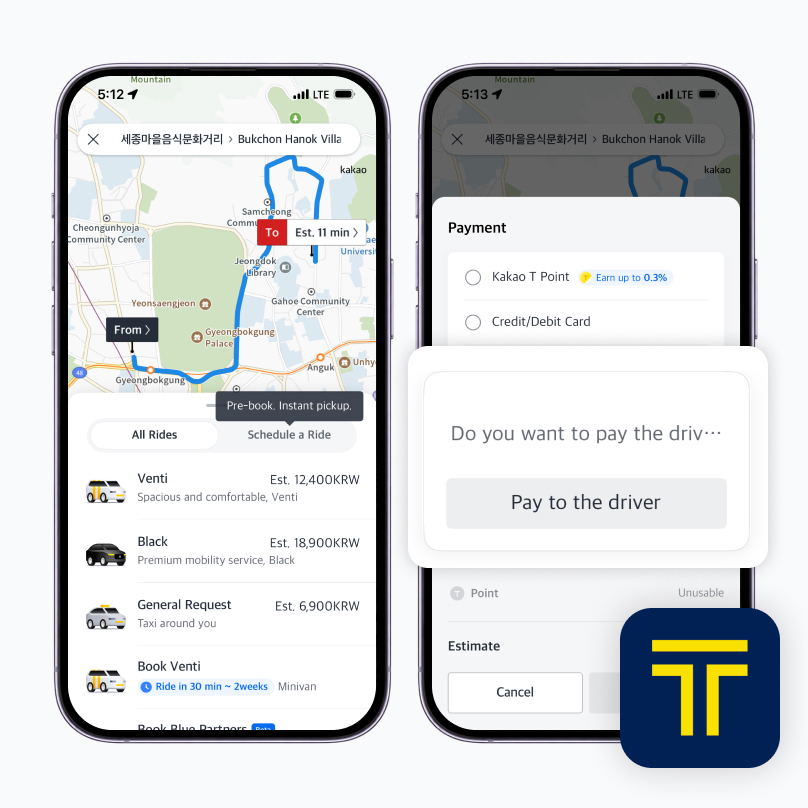
Kakao T is the most widely used taxi-hailing app in Korea. Foreign visitors can sign up with just an email address or a Kakao account — no Korean phone number required — and verify their identity with their own country's phone number. Register a payment method in advance and you'll be charged automatically when you call and pay for a taxi, which is convenient. Cards issued overseas may not always register smoothly, depending on the device or app version.
It's worth installing and signing up before you arrive in Korea for a smoother experience. The Kakao T app supports Korean, English, and Japanese interfaces. You can choose from several taxi types (Blue, Black, Venti, and more) and check the estimated fare in advance, which is convenient. It also has the largest pool of operating vehicles nationwide, including in Seoul, Busan, and Jeju.
Recommended Features
✅ Reserved Call
- Lets you set a pickup time in advance and book a taxi ahead of time — especially useful during high-demand periods, like an early-morning airport trip. You can book for later the same day or even days ahead, and a separate reservation fee applies depending on the vehicle type and time slot. You can cancel free of charge as long as the dispatch hasn't been confirmed yet.
💡 Tip
- If signing up for the Kakao T app is difficult?
→ We recommend using k.ride, Kakao Mobility's official sister app. k.ride is a dedicated global app Kakao Mobility launched specifically to solve the card-registration problem for foreign visitors. You can sign up with a Google or Apple ID even without a KakaoTalk account, and overseas credit card registration and in-app auto-payment work smoothly (actual dispatch connects you with the same Kakao T drivers). - If you can't register a payment method in the Kakao T app?
→ Use 'Pay to the driver.' Set your payment method to 'Pay to the driver' when calling a taxi, then pay with cash, a physical card, or T-money when you get off. - If dispatch is delayed, try switching vehicle types (e.g., from Standard to Blue) and calling again.
- A late-night surcharge (20–40%) applies from 10 p.m. to 4 a.m., so keep that in mind.
- If you have a lot of luggage, we recommend calling a Venti (compact van).
📱 We recommend a voice eSIM/SIM with a Korean number (010)
- If a taxi driver can't find your pickup spot, they may call you. Without a 010 number you can receive calls on in Korea, it can be hard to reach the driver, which may lead to a canceled dispatch or a delayed pickup.
→ If you'll be taking taxis often, choose a voice-enabled eSIM/SIM that comes with a Korean (010) number.
PICK 4
CatchTable Global:
Book a Table Without the Wait
Book a Table Without the Wait
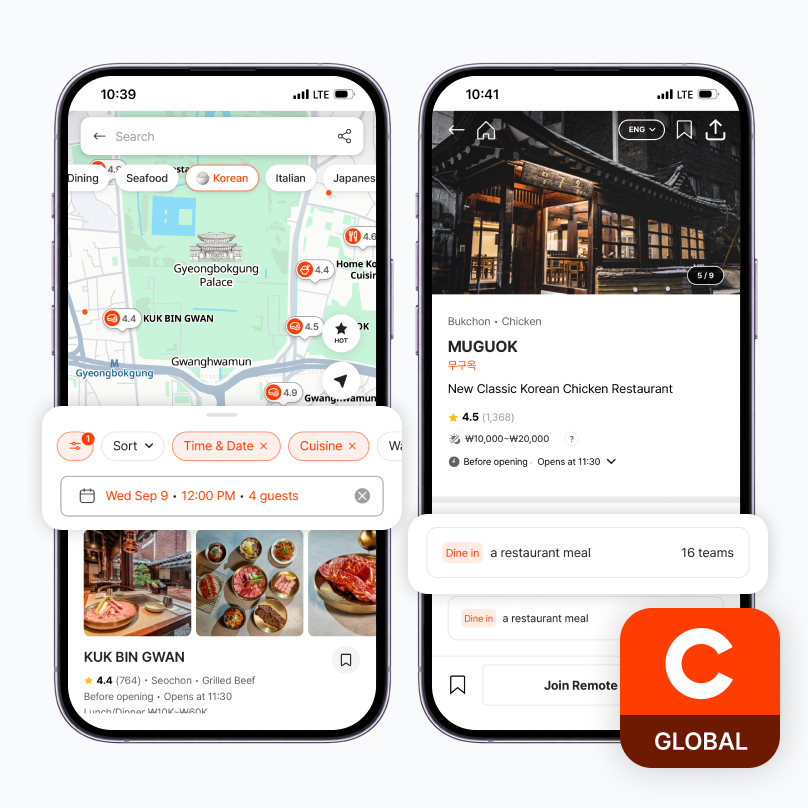
Many of Korea's most popular restaurants require a reservation or a spot on the waitlist. CatchTable Global is a restaurant reservation and waitlist app built specifically for foreign visitors, run separately from the CatchTable app Koreans use. You can sign up with just a Google or Apple account or an email address, skipping the Korean phone number field entirely. You can search for restaurants in 20 languages, the interface supports English, Japanese, and Chinese, and it even includes a review translation feature. Deposits can be paid with an overseas-issued card, and for the waitlist, you're notified of your turn by app push notification and email with no separate deposit required. It's generally more accessible for foreign visitors than other reservation apps that require SMS verification.
📱 We recommend a voice eSIM/SIM with a Korean number (010)
- Some restaurants send reservation confirmations or waitlist updates by SMS or phone call. Having a Korean number means you won't miss the restaurant's contact, so you can respond more easily to your reservation or wait status.
→ If you're planning restaurant reservations or waitlisting, choose a voice- and text-enabled eSIM/SIM with a Korean (010) number — you can check wait alerts while still enjoying the sights nearby.
PICK 5
Baemin: Korean Delivery Food,
Wherever You Are
Wherever You Are
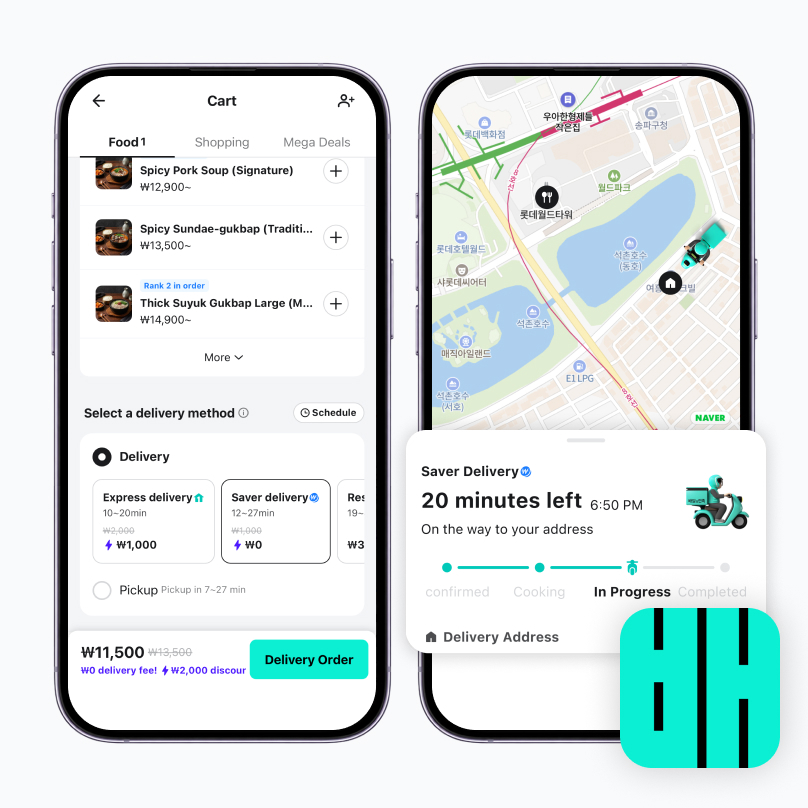
If you want to enjoy Korean delivery food comfortably from your accommodation, Baemin (Baedal Minjok) is a must. Riding the wave of K-culture, delivery culture like chimaek (fried chicken and beer) has spread by word of mouth — from January to July this year, foreign usage on Baemin rose 29% and payment volume rose 45.7% year over year. Starting in June 2026, Baemin began supporting overseas card payments — Visa, Mastercard, JCB, and American Express — through Apple Pay. Before that, in September 2025, it also added Alipay+ and WeChat Pay, and logging in with a Google account lets you use the app without a phone number.
💡 Tip
- Planning a picnic by the Han River? Delivery is available to Hangang Park too. Each park has its own commonly used delivery zone, so make use of it for your picnic as well.
📱 We recommend a voice eSIM/SIM with a Korean number (010)
- Delivery riders sometimes call to confirm your exact location or how to get into a building. This is especially helpful at places that are hard to find, like hotels or Hangang Park, where a phone call makes for a smoother handoff.
→ If you're planning to order delivery, choose a voice-enabled eSIM/SIM with a Korean (010) number and enjoy delicious K-food wherever you'd like, hassle-free.
PICK 6
Korail+ (formerly KorailTalk):
How to Book KTX Tickets
How to Book KTX Tickets
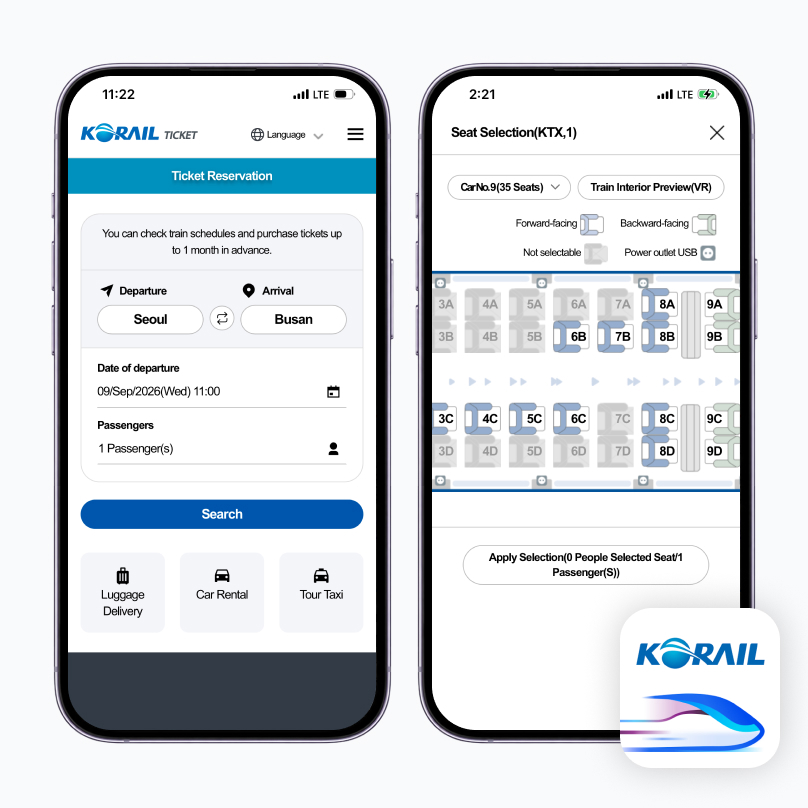
When traveling between Seoul and other cities, Korail+ is all you need. Korail+ (formerly KorailTalk) is the official ticket-booking app run by the Korea Railroad Corporation (KORAIL), supporting nine languages — English, Japanese, Chinese (Simplified and Traditional), Thai, Vietnamese, Malay, and Indonesian. You can sign up using your passport number, so a Korean phone number isn't required.
In the app, search your departure and arrival stations and date to check the KTX (and other train) timetable, select your seat, and pay by card — your ticket is then saved as a mobile ticket in the app. There's no need to print a paper ticket; you can board the train directly. When a conductor asks to check your ticket, just show the mobile QR code.
Recommended Features
✅ Seat Change
- If you want to change your seat after boarding, you can do it right in the app. In the 'My Ticket' tab, select 'Seat Change' to move to an available seat of your choice. (Standing or unassigned seats can only be changed to an assigned seat, and only once.)
✅ Train Location Tracking
- Lets you check the real-time location and any delays of the train you're on — or the one you're waiting to meet — right on a map. Especially useful when your transfer time is tight.
💡 Tip
- If your luggage is heavy or you have a lot of it, try booking the 'luggage delivery' service in the Korail+ app in advance. It's a luggage-forwarding service that carries your heavy bags to the station or location of your choice, so you don't have to lug them around yourself.
Finding your way with a map, keeping the conversation going with a translation app, getting around by taxi and train, and taking care of a meal with a delivery app — with these six apps, the big and small moments of a trip to Korea come together that much more smoothly. But all of these moments only truly come together with a stable, uninterrupted internet connection, so alongside downloading these apps before you arrive, it's worth setting up reliable data ahead of time too. With an LG U+ eSIM, you can enjoy every one of these moments worry-free, without connection drops, throughout your trip. Have an even better trip to Korea with LG U+ 5G eSIM and 010 voice service.
How about it? Are you looking forward to your trip to Korea?
And have you decided what kind of internet to use for your trip? The answer is simple: go with LG U+'s prepaid 5G SIM.
"Conclusion: 5G is simply more convenient during your trip.
And with 010 voice service, your trip to Korea gets even better."
- Feel the speed difference instantly
- Exceptional stability in busy locations
- Enhances the overall experience, from travel documentation and work to navigation
- Beyond data, more varied experiences through 010 voice service for transport, food, and delivery
Enjoy your trip to Korea
even more with LG U+ 5G eSIM
even more with LG U+ 5G eSIM